Superb free firewall to protect your computer

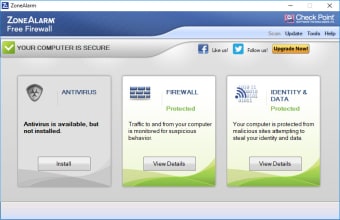
ZoneAlarm Free Firewall is one of the most popular firewall apps available today. It has changed a lot from previous versions, but its performance and ease of use remain the same.

It’s true that third-party firewalls don’t seem that necessary since Microsoft decided to include a built-in firewall in Windows XP, but ZoneAlarm is still a reliable, efficient security tool to protect your system from any unauthorized accesses.

ZoneAlarm features a simple, straightforward interface where you can select the level of security for your computer (none, medium or high) and set the type of program control you want to have. This allows you to control exactly which programs access your internet connection. There's even a Game mode that disables most alerts temporarily, so that you're not interrupted while playing on the PC.

The configuration options in ZoneAlarm Free Firewall seem to have been reduced – at least from what we can remember from older versions – but iregardless, it’s still an extra layer of security anyone can benefit from.

With ZoneAlarm Free Firewall you can protect your computer from hackers, unauthorized access and other online threats.


  • Pros

    • Efficient, reliable firewall
    • Easy to configure
    • Features a Game mode
  • Cons

    • Not many tweaking options
 0/1

App specs

Program available in other languages


User reviews about ZoneAlarm Free Firewall

3.7

5 reviews

Add review

Main reviews for you

  • Anonymous user

    Great free firewall and works great with free antivirus software. I really like the Zonealarm Free firewall, easy to use and configure. Works great with free antivirus, and also paid antivirus.If you want a totally free PC security package, then I think the free zonealarm firewall must be part of it.

  • Anonymous user

    A Good Out Of The Box Free Firewall [Updated Review]. I have updated my Firewall ratings to include 3 factors which are Security, Simplicity and Customizability. This I believe will help users find the perfect firewall for them rather than just go by what's most secure.ZoneAlarm Free is a good out of the box firewall. It offers basic protection and is pretty customizable and simple to use. It does offer more security than Windows Firewall as well and at times gets updated a lot.The downside to ZoneAlarm Free is it's security which barely gets over a 10% rating. Where as others in the top 5 free firewalls tend to score at least a 70%.I recommend ZoneAlarm Free for those who want a simple out of the box experience with no customization required. If your looking for a more secure Firewall then try Comodo Internet Security, Online Armor Free or Privatefirewall. Pros: Good Out Of The Box ExperienceSimple And Easy To UseCustomizable Cons: Low Security RatingCan Freeze Up

  • Anonymous user

    The Best Free Firewall. Of all the firewalls tested I liked this the best.Fully Stealth Mode will make your PC completely hidden from hackers.It will block Trojans from sending your personal information on the net.It is the exact firewall for an average home user.Not too bloated.It does its job.Use ZoneAlarm with a good browser like Google Chrome and a good antivirus like AVG and you will be protected from all kinds of Malware. Pros: Makes your PC hidden from hackersDoes not take too much resourcesFree for lifeBlocks Internet Access to Malicious Trojans Cons: Increases Boot Time

  • Anonymous user

    Firewalls. zonealarm,free is my pick,its dependale easy to install and very useful Pros: free,easy to install,updates are auto notify Cons: none

  • Anonymous user

    Turn your PC into Fort Knox. ZoneAlarm is probably the best free firewall you can get. It's loaded with features and settings. You can protect your connection, your email and be avised of any viruses. ZoneAlarm also constantly informs you of inbound and outbound connections, and you decide if you accept them or not.At first I thought I would keep ZoneAlarm on my PC, but I decided to uninstall for a couple of reasons. First of all it seems to hog CPU usage and dramatically slowed down my PC, especially at start up. Then, I realized that it had totally blocked my internet connection. I also quickly lost my patience with the never ending pop ups to inform me of inbound or outbound connections.I'd only ever install it again if I really, really, really worry about my security. For now, the Microsoft Firewall will do. Pros: Tells you of inbound and outbound connectionsTellls you of any threatFree Cons: Memory hogBlocks some ports and connectionsCan render your internet connection useless

More

You may also like

Alternatives to ZoneAlarm Free Firewall

Explore Apps

Related Articles

Latest articles

Laws concerning the use of this software vary from country to country. We do not encourage or condone the use of this program if it is in violation of these laws.
Softonic

Is ZoneAlarm Free Firewall safe?

100/100

Score result: Clean

This file passed a comprehensive security scan using VirusTotal technology. It is safe to download.

  • Virus free
  • Spyware free
  • Malware free
  • Verified by Security Partners

    VirusTotal logo

Scan Info

Last scan
Saturday, November 11, 2023
Scan provider
VirusTotal · Full report

File Integrity

File
zafwSetupWeb_158_211_19229.exe
SHA256
7829521c2a7defb52fd67cff5a98b81c6467777624d17ba002f663991d2b4fe5
SHA1
108e5ab341d3d83eb58a06ad7a7d4c58960dfd55

Softonic security commitment

ZoneAlarm Free Firewall has been thoroughly scanned by our advanced security systems and verified by industry-leading partners. This file comes from the official developer and has passed all our security checks, showing no signs of viruses, malware, or spyware. For more information, visit our Security and Trust Center